• Registration is now open. It usually takes me a couple of hours or less to validate accouts. If you are coming over from VoD or DR and use the same user name I'll give you Adult access automatically. Anybody else I will contact by DM about Adult access. NOTE I do have spam account creation testing on, but some spam accounts do get through and I check all manually before giving them access. If you create an account where the user name is a series of random letters, the email address is another series of random letters and numbers and is gmail, and the IP you are creating the account from is a VPN address noted for spam, it is going to be rejected without apology.

Whomever Called it "Comfy"UI was High as a Kite

Nyghtfall3D

Moderator
Staff member
I'm trying to learn it for about the sixth time as I experiment with LTX 2.3, and it's still anything but comfy. My brain cannot process anything node-based. It's why I finally gave up on ever mastering Blender, despite repeated, pre-AI attempts to learn it as well.

Last night, I learned they've created "templates" for whatever model you want to work with. They're designed to let beginners like me start rendering anything instantly once you've downloaded the necessary bits and pieces (modes, text encoders, loras, etc.):

LTX 2.3 Template with one of my renders loaded
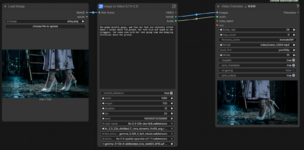
LTX Template.png

But, if you "pop the hood" to make any tweaks to the underlying nodes, the true nature of Comfy's overwhelmingly confusing workflows is revealed:

LTX 2.3 Node Graph
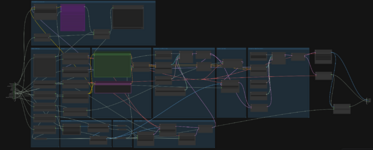
LTX Node Graph.png

Incidentally, LTX has yet to come even remotely close to producing a video with the type of performance I want.
 
Last edited:
Fun fact: Iray's underlying node structure is even more complex, but all Daz users ever have to see and use is the "template" Daz3D calls the Surface pane.
 
It's a programmer's idea of an artistic workflow. It's kinda neat to see how the different components work together, and if you're aligned to that kind of thinking, I'm sure it's super powerful, but otherwise super confusing. But you can mostly ignore everything and just type in your prompt and settings in that one window.

Or, koboldcpp supports video gen now, maybe try that first.
 
But you can mostly ignore everything and just type in your prompt and settings in that one window.
That would be nice, but while experimenting, I also learned that one of the "under-the-hood" nodes is supposed to enhance whatever text prompt you type into the template. Unless you known to open the Node Grid and disable that particular node, LTX might completely mangle the intent behind your prompt while attempting to enhance it, as I discovered with one of my test renders.

Unfortunately, even after disabling that auto-enhance node, LTX still can't deliver for me... and I may have learned why, as experienced users agree Seedance is comparably better than LTX in some respects (link should start at timestamp I marked):


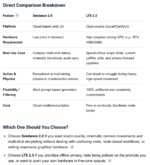
Here's a chart comparing LTX 2.3 with Seedance 2.

I unequivocally fit in the first bullet point about which one to choose, and best suits my needs:

ltx vs seedance.png
 
That would be nice, but while experimenting, I also learned that one of the "under-the-hood" nodes is supposed to enhance whatever text prompt you type into the template. Unless you known to open the Node Grid and disable that particular node, LTX might completely mangle the intent behind your prompt while attempting to enhance it, as I discovered with one of my test renders.
That depends on the current configuration, which depends on the project you have loaded. With images, you can just drag and drop an image into the UI and it'll load up all the settings from the image. Not sure about videos, but you can also save and load presets as jsons. So you can find a simple workflow that doesn't even have that node, or you can delete that node and save the preset.

Where did you get that template from?

But yea like I said, try koboldcpp, that's one executable with pretty simple UI. I've not tried it on videos tho.
 
Back
Top